Showing posts with label Virtual Server. Show all posts

Tuesday, December 27, 2011

Hyper V VM failed to set/change partition property error

Tried setting up a virtualized web farm in machine which is running Intel i5 with Windows Server 2008 R2 standard RTM. Hyper V manager refused to start a virtual machine in a brand new host machine. It has got enough of memory and CPU cores to start the virtual machine.

It keep on showing VM could not initialize < VM Guid > and "failed to set/change partition property" in event viewer.

After an hour of googling found a KB 2517374 article with reference about Intel AVX technology in Sandy bridge processors and some interesting stuff from Jeff Woolsey's Chicken and egg case.

The base funda is Intel's sandy bridge processors were released after the release of Windows Server 2008 R2 RTM, so it doesn't contain the bits to leverage new bells and whistles. As there is a slight change in processor architecture itself, it refuses to start the virtual machines.

Either upgrade to Service pack 1 to make use of Intel AVX in host and guest or install the above mentined hotfix to disable the AVX for the guest OS's

Upgrade to service pack 1 and enjoy the power of AVX(high performance floating point calculations) in both of your guest and host.

Monday, July 27, 2009

How to install Virtual Server 2005 in Windows Vista Home Premium

Disclaimer: This is an unsupported way of running Virtual Server 2005, you should try it on your own responsibility.

Being a SharePoint developer I just wanted to prepare a test web farm for SharePoint using Virtual Server 2005, unfortunately the installer said that I cannot install Virtual Server on Windows Vista Home Premium and it requires more sophisticated Windows Vista editions

It requires Windows authentication in IIS to install its web based management console application, this is what home premium edition is lacking

After a lot of a search and failures, found a solution in an MSDN forum and this solution is NOT supported by Microsoft because we are going to do some unsupported workarounds

  • Turn off UAC and reboot the Vista machine
  • Double click the "Setup.Exe" of Virtual server 2005 and click install.You will be presented that you are running an unsupported operating system. Let the message box be open for some time
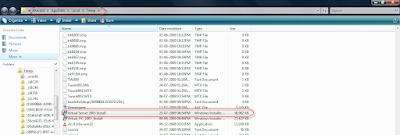
  • Dive in to you Temp folder,in my case it is /Aravind/AppData/Local/Temp/. You might need to enable "Show Hidden Files and Folder" from folder options

  • Copy this ”Virtual server 2005 install.msi” file from there to a safe location.
  • Download Orca MSI editor from this location and install it in your vista. Want to know more about what Orca, go to this KB Article
  • Open "Virtual server 2005 install.msi" in Orca
  • Go to Tools - > options - > find the “Database” tab and put a check mark in “Copy embedded streams during Save as”. Click ok to save the changes

  • There you find two panes, scroll the left pane to find “InstallExecuteSequence” and find “CaCheckOS” in right pane. Right click the entry and say “drop row”.

  • Find “InstallUISequence” from the left pane and find “CaCheckOS” in right pane. Right click the entry and say “drop row”.


  • Save all the changes, close Orca and now initiate the installation from this modified MSI file.
  • Choose a custom setup and disable the “Virtual server web application” option in that screen. Because this option will enable the installation of Web management console which depends on Windows authentication.


  • Here you go, complete the installation and say finish. Now we got the virtual server and related services in place without a web management console


  • Now we dont have a management console to create new VM or manage a VM, here comes Microsoft for our rescue
  • Microsoft provides a tool called VMRC plus which has a full management console, at least it provides 98% of all functionalities (it is mentioned in its help file) and it doesn’t require IIS or even internet explorer.

Here you go with your Virtual server 2005 running on top an Unsupported operating system

Related Links