Tuesday, October 20, 2009
SharePoint 2010 developer documentation and developer center now live on MSDN
The SharePoint 2010 Developer Center is now live on MSDN. Developer documentation is available from SharePoint team blog

Monday, October 12, 2009
C# vs Objective C
Got a chance to mess with Objective C and Cocoa framework. Following are some typical thoughts when comparing with C# and .NET framework
• In Objective C keyword "self" is used instead of "this" of C#
• Memory allocation happens through "alloc", there is no "New" keyword in Objective C
• There is no Garbage Collector to collect objects out of scope, proper release/disposal of resources is essential in Objective C.
• Header files are imported instead of include (i.e #import statements are used instead of traditional #include statements)
• The spec of a class is divided in two parts interface and implementation, interface portion contains declaration class, variables and related methods. This interface normally lives in .h files
• Implementation portion has the actual code for the methods declared in interfaces. This implementation normally stays in .m files. So all classes are like an C# interface and its implementation, declaration and actual code is segregated.
• A class declaration starts with @interface compiler directive and ends with @end directive.
• Object references are pointers. Objective C supports both strongly typing and weak typing. Strong typing always happen with pointer declaration
• There are two types of methods, Instance methods & Class methods, Instance methods require an instance of the class to initiate the call and Class methods are much similar to Static methods in C#
• An instance method is marked with the dash(-) as prefix before the return type and signature of the method.for e.g, -(void)Insertsome:id(anobject)
• An Class method is marked with the plus(+) as prefix before the return type and signature of the method.for e.g, +(void)Insertsome:id(anobject)
• NULL in C# becomes nil in Obj C
• Calling a method is known as messaging,a message is the method signature and its parameters. All messages are enclosed in square brackets [ and ]
• A property declaration starts with @property directive followed by data type and property name.( Eg:- @property BOOL flag;)
• @synthesize compiler directive is used to instruct the compiler to generate methods according to the specification in the declaration
• C# Interfaces are called as Protocols in Objective C
• .XIB files are used to store UI related settings, i.e., if we design a form using the IDE that will be stored as a xib file. In Apple world people still use the legacy name .nib file(that is the legacy name still in use)
• In Objective C a solution is called as a Bundle.
Wednesday, September 23, 2009
First look at Google Chrome's Frame
Are you willing to use Google chrome you don't have privileges to install the new browser. There might be the IT department which may block installing new applications. You might be a SharePoint guy using IE heavily for development related works and also using Google apps like Gmail, Google reader etc for personal things Are you one of them. Google comes up with Chrome Frame
There's a way to leverage Chrome's state-of-the art rendering engine within Internet explorer without installing Google Chrome. Again Google leverages the existing capability to give more comfort to its users just like what happened for XmlHttp object.
Google developed a IE plugin/addon to replace Microsoft's traditional Trident layout engine with Chrome's layout engine based upon Webkit. You can call this Chrome layout by adding the prefix of cf: before any url. For eg:- Google home page will be cf:http://www.google.co.in/
So as a web developer do you want to use the feature of Chrome which is not present in IE(for eg Canvas tags). You just need to add the following meta tag to you code
<meta http-equiv="X-UA-Compatible" content="chrome=1">
Google provides a Javascript code snippet to detect whether Chrome frame exists or not,if not then it will prompt the users to install the plugin
Google's Search home page in Frame

Google Frame's About page

This Frame project is still in its early stages so expect some buggy things too. Let's see how Microsoft handles this plugin in future.
There's a way to leverage Chrome's state-of-the art rendering engine within Internet explorer without installing Google Chrome. Again Google leverages the existing capability to give more comfort to its users just like what happened for XmlHttp object.
Google developed a IE plugin/addon to replace Microsoft's traditional Trident layout engine with Chrome's layout engine based upon Webkit. You can call this Chrome layout by adding the prefix of cf: before any url. For eg:- Google home page will be cf:http://www.google.co.in/
So as a web developer do you want to use the feature of Chrome which is not present in IE(for eg Canvas tags). You just need to add the following meta tag to you code
<meta http-equiv="X-UA-Compatible" content="chrome=1">
Google provides a Javascript code snippet to detect whether Chrome frame exists or not,if not then it will prompt the users to install the plugin
Google's Search home page in Frame

Google Frame's About page

This Frame project is still in its early stages so expect some buggy things too. Let's see how Microsoft handles this plugin in future.
Thursday, September 17, 2009
How to find the site template used on a Site ?
Some times I stumble upon some heavily modified sites to find out the site template(Team site/Blank site etc) used for provisioning that instance. That's quite easy using the object model but I wondered is it possible through some out-of-the box tool or UI's
Recently came across the WSS RPC methods It has a function called GetProjSchema which does this magic
Authenticate with the web application
Remove all strings after the site name from the address bar and append the following string
/_vti_bin/owssvr.dll?Cmd=GetProjSchema
So if you have application as Foo and it has a site called PWA then the URL might be looking like this
http://Foo/PWA/_vti_bin/owssvr.dll?Cmd=GetProjSchema
GetProjSchema requests the CAML Schema for a Web site, this is a blend of ONET.XML for that specific site definition and some resources which are related to that provisioned site instance. This CAML schema is cached in IIS, so we've retrieved this cached version to find out the site template
This gives more details than required but we are now interested in the site template used, look at the first line "Project Title=". This is the current site template being used
A sample screen snap

Anything which comes OOTB capable of solving real world problems is good. Exploit the rendered CAML . .. .
Recently came across the WSS RPC methods It has a function called GetProjSchema which does this magic
Authenticate with the web application
Remove all strings after the site name from the address bar and append the following string
/_vti_bin/owssvr.dll?Cmd=GetProjSchema
So if you have application as Foo and it has a site called PWA then the URL might be looking like this
http://Foo/PWA/_vti_bin/owssvr.dll?Cmd=GetProjSchema
GetProjSchema requests the CAML Schema for a Web site, this is a blend of ONET.XML for that specific site definition and some resources which are related to that provisioned site instance. This CAML schema is cached in IIS, so we've retrieved this cached version to find out the site template
This gives more details than required but we are now interested in the site template used, look at the first line "Project Title=". This is the current site template being used
A sample screen snap

Anything which comes OOTB capable of solving real world problems is good. Exploit the rendered CAML . .. .
Tuesday, September 1, 2009
SharePoint thesaurus files explained
Thesaurus files are used to tailor the search requests to serve a better search results to the end users. We can define multiple synonyms and patterns in thesaurus files
Where to Find the thesaurus files in my Web front end ?
C:\Program Files\Microsoft Office Servers\12.0\Data\Office Server\Applications\GUID\Config
Find TSneu.xml and open it in a editor, this is the language neutral thesaurus files which affects across the site. This file is commented out as an OOTB setting, uncomment this file before proceeding.
insert the following snippet in that file
<replacement>
<pat> laptop </pat>
<pat> notebook </pat>
<sub> Dell </sub>
</replacement>

This configuration explains that if a user searches with string "laptop" or "notebook" those strings were considered as "Dell" before triggering a search.
Restart the Office search service to apply thesaurus changes to the server.
NOTE: NO need for an IISReset or Crawling the content or Index reset just restart the search service
net stop OSearch
net start OSearch
when you search for "Dell" that will be highlighted(technically it is HitHighlightSummary) in the Search description text

When the search string is replaced/handled by a thesaurus in between(in our case it is laptop/notebook) then you cannot see any text as highlighted in its description

Where to Find the thesaurus files in my Web front end ?
C:\Program Files\Microsoft Office Servers\12.0\Data\Office Server\Applications\GUID\Config
Find TSneu.xml and open it in a editor, this is the language neutral thesaurus files which affects across the site. This file is commented out as an OOTB setting, uncomment this file before proceeding.
insert the following snippet in that file
<replacement>
<pat> laptop </pat>
<pat> notebook </pat>
<sub> Dell </sub>
</replacement>

This configuration explains that if a user searches with string "laptop" or "notebook" those strings were considered as "Dell" before triggering a search.
Restart the Office search service to apply thesaurus changes to the server.
NOTE: NO need for an IISReset or Crawling the content or Index reset just restart the search service
net stop OSearch
net start OSearch
when you search for "Dell" that will be highlighted(technically it is HitHighlightSummary) in the Search description text

When the search string is replaced/handled by a thesaurus in between(in our case it is laptop/notebook) then you cannot see any text as highlighted in its description

Thursday, August 27, 2009
Including quotes in verbatim strings
As we all know C# supports two types of strings: regular and verbatim strings. Escape sequence character such as backslash is not processed within this verbatim string sequence except quote-escape-sequence("). I recently stumbled across this C# basic string rule
So to encode a xml fragment like this
string s="[formbody xmlns="http://www.Foo.com/FormBody"][/formbody]"
We should have to write as follows using verbatim character and Quote escape sequence
string s = @"[FormBody xmlns=""http://www.Foo.com/FormBody""][/FormBody]";
but C# handles this quote-escape-character as regular escape sequence internally
 So beware while using verbatim strings and escape sequences altogether especially in cases of handling XML/HTML strings in C# code
For more Check the C# language Specification
So to encode a xml fragment like this
string s="[formbody xmlns="http://www.Foo.com/FormBody"][/formbody]"
We should have to write as follows using verbatim character and Quote escape sequence
string s = @"[FormBody xmlns=""http://www.Foo.com/FormBody""][/FormBody]";
but C# handles this quote-escape-character as regular escape sequence internally
 So beware while using verbatim strings and escape sequences altogether especially in cases of handling XML/HTML strings in C# code
For more Check the C# language Specification
Monday, July 27, 2009
How to install Virtual Server 2005 in Windows Vista Home Premium
Disclaimer: This is an unsupported way of running Virtual Server 2005, you should try it on your own responsibility.
Being a SharePoint developer I just wanted to prepare a test web farm for SharePoint using Virtual Server 2005, unfortunately the installer said that I cannot install Virtual Server on Windows Vista Home Premium and it requires more sophisticated Windows Vista editions
It requires Windows authentication in IIS to install its web based management console application, this is what home premium edition is lacking
After a lot of a search and failures, found a solution in an MSDN forum and this solution is NOT supported by Microsoft because we are going to do some unsupported workarounds
- Turn off UAC and reboot the Vista machine
- Double click the "Setup.Exe" of Virtual server 2005 and click install.You will be presented that you are running an unsupported operating system. Let the message box be open for some time
- Dive in to you Temp folder,in my case it is /Aravind/AppData/Local/Temp/. You might need to enable "Show Hidden Files and Folder" from folder options
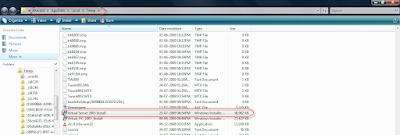
- Copy this ”Virtual server 2005 install.msi” file from there to a safe location.
- Download Orca MSI editor from this location and install it in your vista. Want to know more about what Orca, go to this KB Article
- Open "Virtual server 2005 install.msi" in Orca
- Go to Tools - > options - > find the “Database” tab and put a check mark in “Copy embedded streams during Save as”. Click ok to save the changes

- There you find two panes, scroll the left pane to find “InstallExecuteSequence” and find “CaCheckOS” in right pane. Right click the entry and say “drop row”.

- Find “InstallUISequence” from the left pane and find “CaCheckOS” in right pane. Right click the entry and say “drop row”.

- Save all the changes, close Orca and now initiate the installation from this modified MSI file.
- Choose a custom setup and disable the “Virtual server web application” option in that screen. Because this option will enable the installation of Web management console which depends on Windows authentication.

- Here you go, complete the installation and say finish. Now we got the virtual server and related services in place without a web management console

- Now we dont have a management console to create new VM or manage a VM, here comes Microsoft for our rescue
- Microsoft provides a tool called VMRC plus which has a full management console, at least it provides 98% of all functionalities (it is mentioned in its help file) and it doesn’t require IIS or even internet explorer.

Here you go with your Virtual server 2005 running on top an Unsupported operating system
Related Links
Subscribe to:
Comments (Atom)